AI-generated images are now realistic enough to appear in news feeds, product listings, dating profiles, and insurance claims. Spotting them by eye is increasingly unreliable, which is why the AI image detector has become a standard verification tool for journalists, platforms, and businesses.
But a detector is only as useful as the way you use it. This guide covers the technical signals an AI image detector analyzes, the specifications worth checking before you trust a tool, and the best practices that lead to reliable decisions. It also explains how CudekAI approaches the problem.
What Is an AI Image Detector?
An AI image detector is software that estimates whether an image was generated or altered by an AI model. Instead of judging whether a picture looks real, it examines patterns that generation models tend to leave behind: statistical regularities in pixels, textures, lighting, and structure that human eyes usually miss.
The output is a probability, not a certificate. A detector tells you how strongly an image resembles AI-generated material. It does not prove who made the image or how.
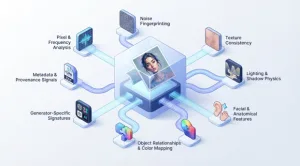
How an AI Image Detector Works: The Technical Layers
Modern detection rarely depends on one signal. Reliable tools combine several layers of analysis, because each layer catches things the others miss.
1. Pixel-level and frequency analysis
Generative models build images in ways that differ from a camera sensor. The result can be subtle regularities in pixel distributions and frequency patterns, sometimes called artifacts or fingerprints. Detectors trained on large sets of real and synthetic images learn to recognize these patterns.
2. Noise fingerprinting
Real photographs carry sensor noise tied to the camera, lens, and processing pipeline. AI-generated images tend to have a different noise structure, or noise that is too uniform. Examining the noise profile is one of the more robust ways to separate captured images from synthesized ones.
3. Texture and surface consistency
Generated images often show over-smoothed skin, repetitive micro-textures, or surfaces that look slightly too clean. A detector measures texture statistics across the image and flags areas that depart from natural patterns.
4. Lighting and shadow physics
Real scenes obey physical rules: light sources are consistent, shadows fall in matching directions, and reflections correspond to their surroundings. AI images sometimes break these rules in small ways. Analyzing lighting and shadow coherence helps expose them.
5. Facial and anatomical features
Faces, hands, teeth, and eyes remain difficult for generators. A detector checks proportions, symmetry, and fine details such as the structure of eyes and the way hair meets skin.
6. Object relationships and color mapping
Another layer examines whether objects relate to each other plausibly, and whether color distribution matches natural images. Unusual color transitions or objects that blend into each other can indicate synthesis.
7. Generator-specific signatures
Different generation tools leave different traces. A detector that recognizes the signatures of specific tools can be more accurate than one that only looks for generic “AI-ness.” CudekAI uses generator-aware analysis for outputs from tools such as DALL·E 3, Midjourney v6, Stable Diffusion XL, Bing Image Creator, Adobe Firefly, and Leonardo.AI.
8. Metadata and provenance signals
Some images carry embedded information about their origin, such as EXIF data or content credentials like C2PA. Some generators also add invisible watermarks. These signals are valuable when present, but they are easy to lose: screenshots, re-uploads, and social platforms often strip metadata. This is why pixel-level analysis remains essential.
Technical Specifications to Check Before Choosing an AI Image Detector
Marketing pages rarely show the details that decide whether a tool fits your workflow. Before adopting any AI image detector, look for answers to these questions.
| Specification | What to check |
| Detection method | Does it use multiple layers of analysis, or a single classifier? |
| Output format | Does it give a probability or likelihood tier, and is the result explained? |
| Generator coverage | Which image generators is it trained to recognize, and how often is it updated? |
| Manipulation vs. generation | Can it tell fully generated images from edited real photos? |
| Reported accuracy | Is the figure vendor-reported or independently tested, and on what data? |
| Input handling | How does it handle compressed, resized, or low-resolution images? |
| Scope | Does it also cover deepfakes, fake documents, video, or other formats? |
| Access and pricing | Is there a free tier, and what limits apply? |
| Privacy | How are uploaded images stored and used? |
CudekAI’s image detector uses multi-layer analysis across the signals described above, classifies images by AI probability level, and reports roughly 94% accuracy. CudekAI’s image and video detectors are also designed to flag deepfake media, and a free tier is available. As with any vendor-reported figure, test it on your own images.
Best Practices for Using an AI Image Detector
1. Start with the highest-quality file you can get
Every resize, crop, and compression pass destroys some of the signal a detector relies on. When possible, test the original file instead of a screenshot or a re-saved copy. If a detector gives a confident result on a degraded copy, that is a good sign, but a weak result on a heavily compressed image should not be read as proof of authenticity.
2. Read results as tiers, not verdicts
CudekAI’s image detector classifies an uploaded image as low, medium, or high AI probability. Treat those tiers as guidance for how much additional checking to do. A high result calls for follow-up before publishing or acting. A medium result calls for more evidence. A low result is reassuring but not conclusive.
3. Check provenance alongside pixels
Look for content credentials, metadata, and the original source of the image. Run a reverse image search to find earlier versions. An image that appears for the first time with no history, from an account with no track record, deserves more scrutiny than one with a documented origin.
4. Combine automated and visual checks
Use the detector to guide your attention, then examine the flagged image yourself. Look at hands, teeth, text in the background, reflections, and repeating patterns. Human review catches context a model cannot, such as whether an image makes sense for the claimed event.
5. Test with known samples
Before relying on a tool, run a set of images you know to be real and images you know to be AI-generated. Include different subjects, such as portraits, landscapes, product shots, and documents. This shows how the detector behaves on your kind of content and helps you spot false positives.
6. Account for edited and mixed images
An image can be real but retouched, or real with an AI-generated element added. These hybrids are harder to classify than fully generated images. If your use case involves edited photos, check whether the detector distinguishes generation from manipulation.
7. Re-test as generators evolve
Detection is an arms race. A tool that performs well on today’s generators may lose accuracy on tomorrow’s. Research on image detectors shows that systems trained on one family of generators can degrade when they meet unfamiliar ones. Choose a vendor that updates its models and re-run your test set periodically.
8. Document your process
If a result will inform an editorial, legal, or financial decision, record what you tested, which tool and version you used, what the result was, and what other checks you ran. A documented process is easier to defend than a single screenshot.
9. Don’t treat a score as legal proof
A detector’s output is evidence, not a ruling. For high-stakes cases such as fraud claims or legal disputes, combine detection with forensic review and human expertise.
Common Pitfalls to Avoid
- Trusting one tool blindly. Detectors disagree, especially on unfamiliar generators or heavily processed images.
- Ignoring false positives. Real photos that are heavily filtered, upscaled, or compressed can be flagged incorrectly.
- Assuming no metadata means fake. Many platforms strip metadata from genuine photos.
- Assuming metadata means real. Metadata can be edited or fabricated.
- Treating accuracy claims as universal. A figure measured on one dataset may not apply to your images.
Where CudekAI Fits In
CudekAI is a multi-format AI detection platform. Its AI image detector combines multi-layer analysis with generator-specific signatures, offers a free tier for testing, and sits alongside CudekAI’s text detection and plagiarism tools, so teams that review more than one content type can work in one place. That makes it a practical option for journalists verifying viral images, marketplaces screening listings, HR teams checking candidate photos, and businesses reviewing supporting documents.
For best results, use CudekAI the way you would use any AI image detector: as one strong signal inside a broader verification process.
Key Takeaways
- An AI image detector analyzes pixels, noise, textures, lighting, anatomy, and generator signatures, and sometimes metadata, to estimate whether an image is synthetic.
- Technical specifications matter: check detection method, generator coverage, accuracy evidence, input handling, scope, and privacy.
- Use the original file, read results as tiers, check provenance, and combine automated and visual review.
- Test any tool on known samples and re-test as generators evolve.
- CudekAI offers multi-layer, generator-aware image detection with a free tier, which makes it a practical place to start.
FAQs
How does an AI image detector work?
It analyzes visual patterns such as pixel statistics, noise, texture, lighting, and facial detail, and compares them with patterns learned from real and AI-generated images. The result is a probability.
How accurate is an AI image detector?
It varies by tool, generator, and image quality. CudekAI reports roughly 94% accuracy, but no detector is perfect, so test on your own images and use results as guidance.
Can an AI image detector work without metadata?
Yes. Pixel-level analysis does not depend on metadata, which is useful because screenshots and social uploads often strip it.
Can it detect deepfakes and edited photos?
Many detectors cover some manipulation, and CudekAI’s image and video detectors are designed to flag deepfake media. Edited and mixed images are harder to classify, so confirm with other checks.
Is there a free AI image detector?
CudekAI offers a free tier that lets you test the AI image detector on your own images.
Does a high AI probability prove an image is fake?
No. It means the image strongly resembles AI-generated material. Confirm with provenance checks and human review before acting.